Object Inspector
Go Up to Tool Windows Index
View > Tool Windows > Object Inspector
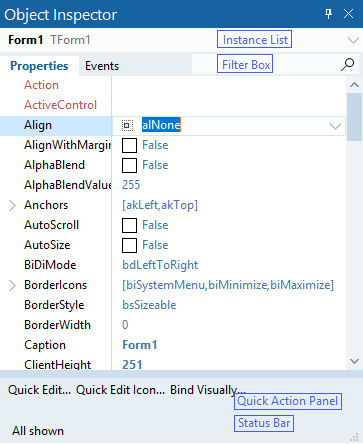
Use the Object Inspector to examine and edit the properties and events for the currently selected object or objects. F11 reopens the Object Inspector.
F11 moves the focus to the filter box on the Object Inspector, and toggles between the Object Inspector and the last active form or Code Editor file.
Use the Object Inspector to edit property values and event-handler links.
| Tab | Description |
|---|---|
|
Properties |
Displays the properties for the selected object on a form. See Properties page. |
|
Events |
Displays the events for the selected object on a form. See Events page. |
Context Menu
Right-click the Object Inspector to display the following commands.
| Item | Description |
|---|---|
|
View |
Filters the display of properties or events. The available options varies depending on the selected object. |
|
Arrange |
Sorts the properties or events by name or by category. |
|
Allows full customization of the Object Inspector layout. | |
|
Revert to Inherited |
Changes the property setting back to its original, inherited value. |
|
Expand |
Expands the selected property or event. |
|
Collapse |
Collapses the selected property or event. |
|
Help |
Displays the Help topic. |
|
Properties |
Displays the Object Inspector Properties dialog box, allowing you to change the appearance of the Object Inspector. You can also access the properties at Tools > Options > Environment Options > Object Inspector For more information see Object Inspector (Options). |
|
Stay on Top |
Displays the Object Inspector on top of the desktop when other windows are displayed. |
|
Dockable |
Enables drag-and-dock behavior for the Object Inspector. |
Object Inspector Customization
Customize the Object Inspector using the Show menu on the context menu.
The new Show option allows you to show or hide different parts of the Object Inspector.
Show Menu Options
| Item | Description |
|---|---|
|
Instance List |
Shows or hides the combo box listing the objects from the form. |
|
Filter Box |
Shows or hides the filter box. It allows filtering properties or events. The filter shows all the properties or events which name contains any match with the searching pattern. Click Esc or the cross icon |
|
Quick Action Panel |
Shows or hides the Quick Action Panel. It lists direct actions that can be performed on the selected object on the form. |
|
Description Panel |
Shows or hides the Description Panel. This option comes hidden by default. It shows information about the selected property or event. |
|
Status Bar |
Shows or hides the Status bar. It informs you about the amount of hidden properties. You can hide properties according to their functionallity using the option View from the context menu. When all the properties are listed, the message All Shown appears. |
