13 Florence - Release 1
Go Up to Main Page
Go Up to What Was New in Past Releases
Updated RAD Studio 13.1 Florence release available (March 18th, 2026).
RAD Studio 13 Florence - Release 1 (also known as 13.1) is available for installation. RAD 13.1 builds on the feature set of RAD Studio 13, enhancing existing features throughout the product and adding new capabilities.
RAD Studio 13.1 focuses on quality improvements and includes significant enhancements to the C++ toolchain and the IDE. Key features and quality focus areas include:
Key Enhancements by product area in 13.1
The following sections show key 13.1 improvements by area.
IDE and IDE Tools
Save VCL DFM file at 96 DPI
RAD Studio 13.1 release introduces the ability to save forms at 96 DPI regardless of the design DPI. This can be handy for team members working on the same project with different resolutions and different HighDPI IDE configurations. Enable this option by navigating to Tools > Form Designer > High DPI.
Bookmarks Addon Integration
Florence 13.1 fully integrates the Bookmarks Addon into the IDE, originally from Parnassus and previously available as an additional download in GetIt.
The Bookmarks plugin fully replaces the corresponding IDE’s built-in bookmarks functionality. Find the settings in the Options dialog box under Editor > Bookmarks.
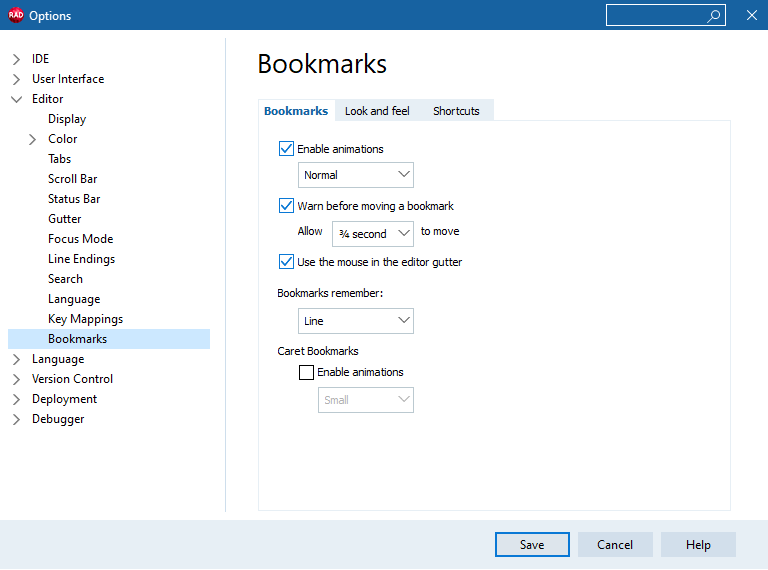
The following are some of the features that the extended Bookmark version offers:
- The number of active bookmarks is unlimited.
- Place or remove a marker using the
Ctrl+Bkeys, and a number is automatically assigned, rather than usingCtrl+numberto define a bookmark. - Jump between bookmarks by pressing
Ctrl+Alt+LeftorRightArrow. - Press
Ctrl+Shift+Bto drop a temporary caret bookmark, and press Escape to jump back to it. - Updates to the Bookmarks ToolsAPI to use the new IDE Parnassus Bookmarks integration.
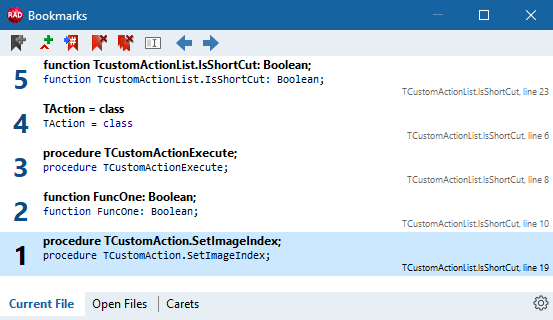
- There is a panel View > Tool Windows > Bookmarks showing the list of active bookmarks with a clear indication of the line of code they refer to, along with additional context. See image below:
Delphi LSP and LSIF
RAD Studio 13.1 updates the Delphi Language Server Protocol (LSP) engine with support for the Language Server Index Format (LSIF).
This architectural change aims to reduce dependence on the compiler, thereby improving the performance, stability, and accuracy of Code Insight. For more information, see the Delphi LSIF documentation page.
Enhancements to IDE Styles and UI Windows 11
RAD Studio version 13.1 updates the IDE VCL style to align with the Windows 11 UI. The following lists the major improvements:
- The product includes new Windows 11 light and dark styles.
- The IDE loads a Windows 10-style interface on Windows 10 and switches to a Windows 11-style interface on Windows 11.
- The work includes support for rounded edges in many windows, an enhanced IDE search control, and a navigation toolbar.
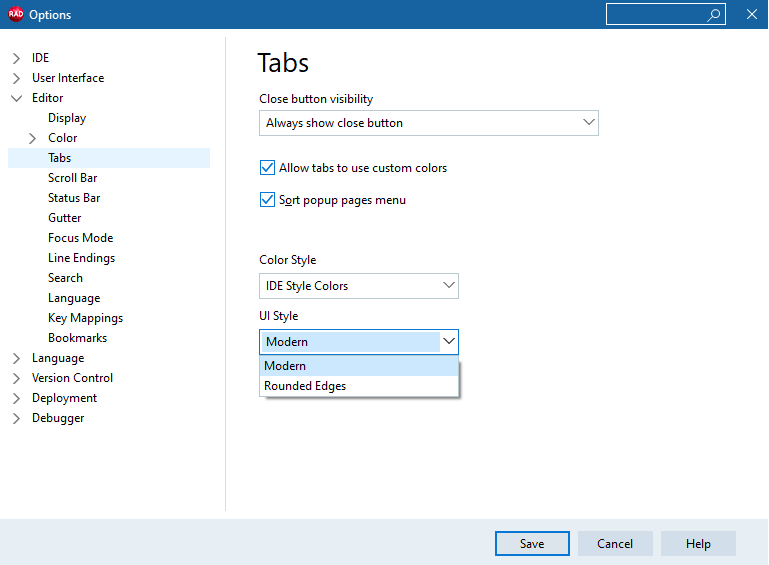
- There is a specific setting in the Editor > Tabs section of the TOptions dialog box that allows users to choose the UI style for editor tabs.
- Modern (square borders).
- Rounded Edges (rounded corners).
Debugger Updates
This release focused on improving debugger quality, particularly for the 64-bit Delphi and C++ (Modern) debuggers. The following are some of the improvements:
- Addresses several scenarios (primarily related to exception handling) in which the debugger would stop with the error
“thread id -1”.
Embarcadero Product Registration Modernization
The 13.1 release includes a significantly updated Licence Manager application and Product Registration dialog box. This modernization includes VCL applications that support HighDPI via the Per Monitor v2 configuration, updated fonts, and an overall UI cleanup. See more information in the Embarcadero Product Registration page.
Additional IDE Improvements
The following are other minor improvements to the IDE for RAD Studio Florence 13.1:
- Updated the Feature Manager screen to display all Target Platforms.
- The New Items Gallery dialog images have been replaced with higher resolution images that look crisper on HighDPI systems.
- The Registered Type Libraries View uses a TVirtualStringTree control, instead of the TListView control. This release also updated several icons used in its toolbar.
- The Symbol Tables Page and the Environment Block Page in the Project Options dialog box also use a TVirtualStringTree control rather than a TListview control.
- The MigrationTool.exe application is now High DPI Aware and supports Per-Monitor v2.
- The UI for License Manager has been updated to support HighDPI, VCL styling, and improved fonts and overall UI.
- The Bitmap Style Designer is now DPI aware.
- Added Icons to the menu items in the IDE Style Selection and Code Editor Themes Selection menus.
- The Smart CodeInsight configuration for OpenAI has been renamed to reflect the company name rather than its most popular LLM (ChatGPT).
- The Attach to Process dialog's list view now displays process icons.
Native Delphi Arm64EC Toolchain
RAD Studio Florence 13.1 introduces a new native target platform for Delphi: Windows on Arm. Delphi now supports creating native Arm binaries that run on Windows Arm devices (or Windows on Arm Virtual machines running on Macs), without using the Intel emulation layer.
Delphi Windows on Arm applications interface directly with the Windows 64-bit Arm API, which is almost identical to the 64-bit Windows API. Delphi generates Arm64EC binaries, an ABI for Windows on Arm promoted by Microsoft for its flexibility in mixing Intel libraries with a main Arm executable.
The Delphi Windows on Arm toolchain is based on LLVM version 20; it leverages linkers and some RTL services from the LLVM project. Learn more about the features on the Arm64EC page.
Compiler, Toolchains, and Platform Updates
The following section details updates and improvements to the RAD Studio’s Compiler, Toolchains, and Platforms.
Delphi Compiler Improvements
There is quality work for the Delphi compiler. This release includes the following updates:
- A fix for a regression with some ambiguous calls and type incompatibilities when using AnsiChar and ShortString (for example, when calling Pos).
- Improvements in floating-point and integer type compatibility when using the new ternary if operator.
- Added a new warning message, “W1080 NORETURN procedure %25s should not return”. This message is triggered when the noreturn attribute is applied to a procedure or function with a return path.
C++ 64 Modern Platform Toolchain
This release primarily focused on improving the quality of the C++ 64-bit Modern compiler. The following are some of the major improvements:
- This release adds the clang-scan-deps application to the Clang package for fast dependency scanning.
- This release adds support for the latest Windows SDK and improves the algorithm for importing Windows SDK.
- The algorithm no longer depends on the SDK installation order.
- Installation of an unsupported Windows SDK alongside a supported version works correctly during import.
- Unicode path handling improvements for linker invocation.
Also, Florence 13.1 enabled the Add Featured Files option in the Deployment Manager for C++Builder Modern projects.
Support for Android API Level 36
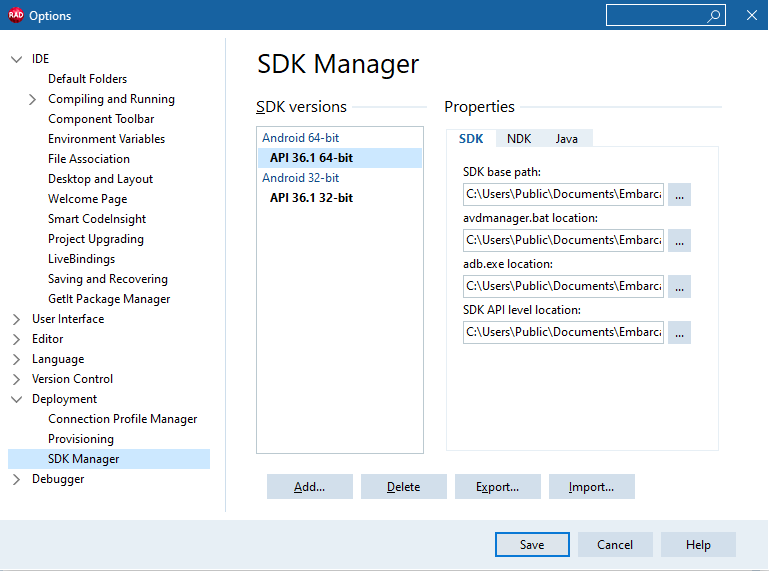
The 13.1 release adds support for Android API level 36.1. RAD Studio upgraded the build system and platform.jar file to support Android API level 36.1. In addition, this release also brings the following improvements:
- Updated the targetSdkVersion manifest attribute to 36.
- The Android SDK installation uses the 'Platform 36.1' Android SDK package.
- Updated the Project > Options > Application > Uses Permissions options page to include new uses permissions from the Android API level 36.1.
- Upgraded the Jetpack Core library version that the FireMonkey framework depends on.
- Updated the Delphi Android compilers to pass the
'-h'option to the external linker, to generate'.so'files with the expected'DT_SONAME'entry in the'.dynamic'section. These changes enable building a so-library for Android. - Removed the hints for the 'Android SDK base path' and 'Android NDK base path' options. Now RAD Studio automatically detects the 'Android SDK' path using four detection strategies; learn more about the process on our Create a New Android SDK page.
- Added support for the “opt out of predictive back navigation” feature on Android 16 devices.
This requires a manifest change. If you are updating an existing 13.0 installation, you need to clear the
'%APPDATA%\Embarcadero\BDS\37.0' directory to avoid using the 13.0 version of the manifest in new applications.iOS Platform Improvements
RAD Studio version 13.1 adds official support for iOS 26.
After upgrading iOS API headers in RAD Studio Florence 13, the signature of some methods changed. As a result, some functions return an instance rather than an ID, and vice versa. The RTL code had places where ID was wrapped in Wrap methods. These are no longer correct, so this release removed several unnecessary Wrap calls.
The following are some additional updates to the iOS Platform:
- This release delivers updated versions of the Firebase SDK package (Firebase SDK for Apple Platforms 12.7.0).
- Increased the default value for the 'Minimum iOS version supported' option under Building > Delphi Compiler > Linking from '11.0' to '15.0'.
- Updated versions for the Firebase SDK package (Firebase SDK for Apple Platforms 12.7.0) and the AdMob package (based on the 12.14.0 version of the AdMob SDK) for iOS in GetIt Package Manager.
- This release migrates to the UIKit scene-based lifecycle (from the UIScene lifecycle).
Library Updates
This section shows the major improvements and updates to the different RAD Studio libraries.
VCL Enhancements
The 13.1 release offers the following updates and improvements:
- Added new Windows 11-specific VCL styles, updated to the UI of the new version of the operating system:
- Windows Modern
- Windows Modern Dark
- Windows Modern SlateGray
- Windows Modern Green
- Windows Modern Blue
- Windows Modern Purple
- Integration of the multiline editor for the Text property of the TTaskDialog component.
- Added support for a new mechanism that enables simple calculations in specific numeric fields of the Object Inspector. This feature is enabled for the
Left,Top,Height, andWidthproperties of TControl and derived classes.
FireMonkey Style Designer
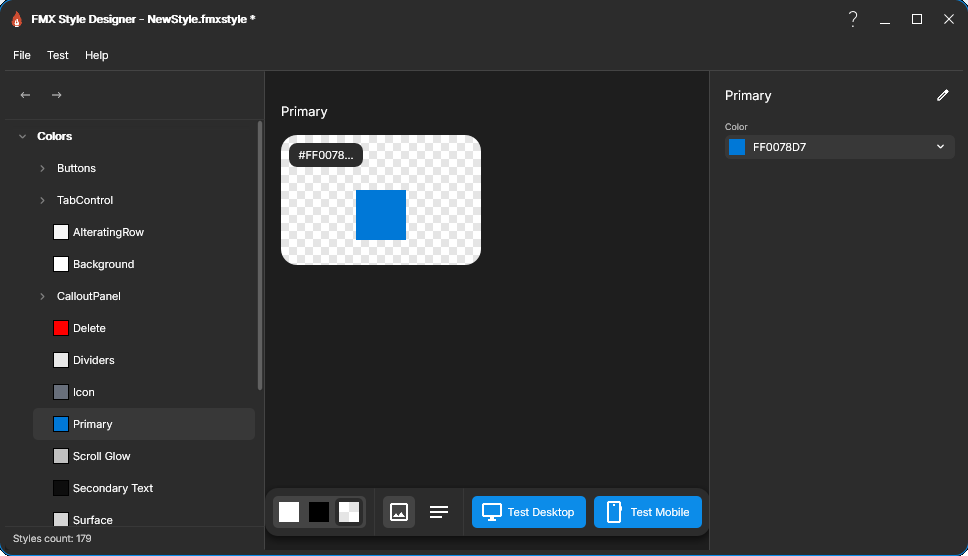
Florence 13.1 introduces a new FireMonkey Style Designer, designed for modern design principles and specifically intended for FMX use.
This standalone application helps users create and manage FMX styles for RAD Studio. A simple-to-use tool that provides a design-centric interface where you work with high-level concepts: colors, backgrounds, typography, and interaction states. Meanwhile, the tool automatically handles the technical translation into FireMonkey's style format.
Find more information on the core concepts and how to use this new tool in the FireMonkey Style Designer page.
Other FireMonkey Improvements
FireMonkey notable improvements include:
- Updated Skia for Delphi to version 7.1.0.
- Support for Tinted Glyph. A new control, TTintedGlyph, that supports recoloring icons in an ImageList.
- Support for Linux styles and views in the IDE designer.
- Support for DirectX texture filtering.
- Improved the way a TFrame embedded in a FireMonkey form is aligned and manages its margins.
Web Client Libraries Updates
This release brings the following updates to the Web Client libraries:
- The TWinHTTPClient component now supports an option in the underlying WinHTTP library to enable IPv6 fast fallback to IPv4. This bypasses the 60-second IPv6 timeout, which could block an app before switching to IPv4.
- Added support for Server-Sent Events (SSE). This feature is enabled for both Web servers and Web clients.
- At server level: Implemented a new class TWebResponseStream representing a response stream, and new methods for TWebResponse: BeginStream and BeginEventsStream.
- Note:
This support is available on Indy, Apache, IIS, and FastCGI WebBroker platforms.
- At server level: Implemented a new class TWebResponseStream representing a response stream, and new methods for TWebResponse: BeginStream and BeginEventsStream.
- On client side: implemented the feature in the new System.Net.HttpSse unit (available on all platforms), with classes such as THTTPEvent and THTTPEventSource.
Database and FireDAC Enhancements
The Florence 13.1 release brings the following updates:
- FireDAC adds support for:
- SAP ASE Server version 16.1.
- IBM DB2 12.1
- MariaDB Server 12.1
- The legacy SQLite encryption has also been made available for 64-bit Windows applications.
WebBroker and WebStencils Updates
This release adds Apache configuration support (available in Delphi since version 13.0) to C++ Builder.
This release also updates the WebBroker Wizard C++ template to generate an Apache configuration sample, as it does in Delphi.
RAD Server Improvements
RAD Server Lite now offers integrated TLS 1.3 support. It is necessary to download and distribute the OpenSSL 3 library alongside your application, as RAD Studio does not include it.
Delphi RTL Updates
This release improved the 32-bit version of the TStream.Seek component.