13 Florence - Release 2
Go Up to Main Page
Go Up to What Was New in Past Releases
Updated RAD Studio 13.2 Florence release available (September 17th, 2026).
Key Enhancements by product area in 13.2
RAD Studio 13 Florence - Release 2 (also known as 13.2) is available for installation. RAD 13.2 builds on the feature set of RAD Studio 13, enhancing existing features throughout the product and adding new capabilities.
The following sections show key 13.2 improvements by area. Key quality focus areas include:
- IDE and IDE Tools
- OpenTools API for Third-Party Formatters
- Delphi LLVM20 Linux Compiler
- Windows Arm64EC
- C++ Clang 20 Compiler and Toolchain
- Debugger
- Delphi Android
- New VCL Controls
- FMX Style Designer Extensions
- FireDAC
- WebStencils and Internet
- RAD Server
IDE and IDE Tools
The following section details enhancements and improvements in the IDE and IDE Tools.
The RAD Studio 13.2 release integrates the navigator plugin, enhances the editor minimap to indicate the active line, and adds support for scrollbar annotations, breakpoints, and error insight annotations.
- Goto: fast-moving navigation dialog that allows quick access to units, types, methods, and other symbols in the codebase.
- Configuration: the Navigator configuration is in the Tools Options dialog box.
- Minimap: provides a preview of the current module, displayed alongside the code editor.

OpenTools API for Third-Party Formatters
The IDE offers new OTA interfaces:
The interfaces include functions for registering and unregistering formatters (AddFormatter / RemoveFormatter).
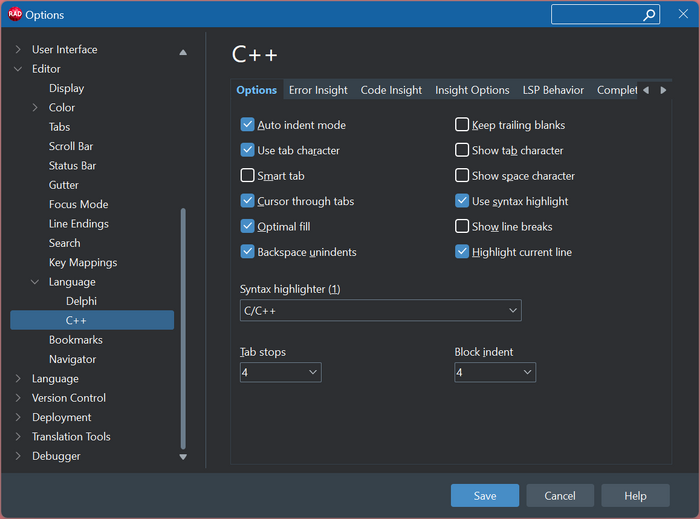
Reorganized Code Insight Options Window
This release reorganized the Code Insight Options page, adding separate pages for each language.
IDE Improvements
There are several other improvements and relevant quality fixes in the RAD Studio IDE. The most relevant ones are listed here.
HighDPI Support for FMX Style Viewer tools
The FMX Style viewer's tools were DPI-unaware, resulting in poor scaling on high-resolution displays. This release updates them to High DPI-Aware with Per-Monitor v2 Support:
- FMXControlStyleViewer.exe
- FMXMetropolisUIStyleViewer.exe
- FMXMobileStyleViewer.exe
- FMXStyleViewer.exe
- FMXWinModernStyleViewer.exe
IDE Insight Improvements
This release includes the following IDE Insight improvements:
Enhanced the No Matches Found dialog to improve user experience.
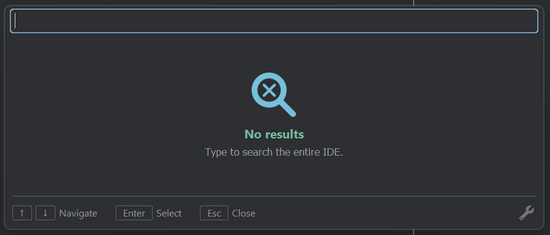
New IDE Insight options Window that allows users to configure their preferred IDE Insight experience.

Improved the IDE Insight popup item screen with enhanced spacing and support for IDE theme-aware colors.

Improved Braces/Parenthesis Pairing in the Editor
This release addressed some existing issues with the brace and parentheses pairing in the editor for both Delphi and C++. The improvement takes into account the following scenarios:
- If one of the pairs is in a string or a comment, match only with another pair that is also in a string or a comment.
- If one of the pairs is not in a string or comment, only match with another that is neither a string nor a comment.
- When already within a string or comment, ignore the nestable flag.
- For pairs that don't have an implied direction, look at the syntax-highlight on either side to know if it's the start or end.
Form Inheritance Improvements
This release includes several improvements related to form inheritance, better accounting for the scaling of the base and the inherited form in the HighDPI IDE, improved automatic opening of base forms when an inherited one is opened in the IDE, and a few related long-standing issues.
Addressing off-by-one insertion issues
This release addressed some long-standing issues in the editor when using the IDE CodeManager to add code, such as event handlers or project file information, and the source code used LF (Line Feed) instead of CRLF (Carriage Return + Line Feed).
Now both LF and CRLF work as expected without causing the editor to fail.
New Control Hints
In the past, the VCL designer offered component and control hints by displaying core information on the control under the mouse, as shown below:
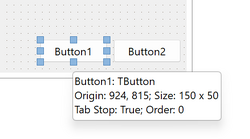
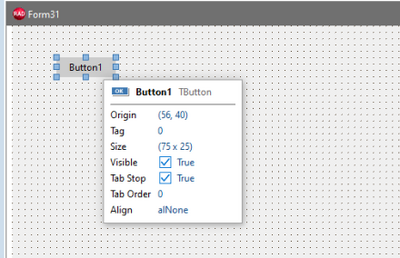
The Florence 13.2 release significantly extends the information displayed and improves readability with smoother formatting and visual support for specific information such as Boolean values. Now the button hint looks as follows:
Additional IDE Changes
- This release updates the configuration to use the multiline property editor, enabling string values with multiple lines in collections.
- In this release, the IDE improved syntax highlighting for C++ features such as binary literals, Numeric separators, and Raw string literals.
- RAD Studio version 13.2 removes the 2K limit on a single string in the Object Inspector. This change does not affect the Object Inspector’s multi-line string property editor.
- Added a new editor option "Reload Open Modules" to reload all open modules in the IDE, with a warning when a module cannot be reloaded.
- Included the option to place the Main Menu in the IDE Title Bar for a more Space-Efficient UI.
- Fixed an issue in C++, where a line comment ending with backslash \ yields unexpected results.
- The C++ Formatter no longer crashes when a user's clang-format file is present.
- The IDE renders Keyboard Shortcuts as Key Caps (using a modern UI style).
Compilers, Toolchains, and Platforms
This section details improvements to the compilers, toolchains, and platforms.
Delphi LLVM20 Linux Compiler
The 13.2 release offers significant updates to the Delphi Linux compiler, including support for LLVM 20, bringing it on par with the Arm64EC Delphi compiler introduced in RAD Studio 13.1. The new compiler is itself a 64-bit binary, allowing integration into the 64-bit RAD Studio IDE.
Previously, the Delphi compiler for Linux, DCCLINUX64, used LLVM v3.3 as its backend. Now it has been upgraded to use LLVM v20.1.8, the same backend used by DCCARM64EC.
A customized version of LLD from LLVM v20.1.8, dcc-ld.lld.exe, is now used as the official linker, replacing the deprecated GNU gold linker, ld-linux.exe. This is now the same linker technology used by DCCARM64EC.
Additionally, this release upgraded from DWARF v2 to v4, resulting in more complete Debug information; it also includes front-end refactorings that improve how debug metadata is emitted.
An important change in this update is that applications now link against glibc 2.31. As a result, applications are not expected to run on distributions older than Ubuntu 20.04 LTS, such as Ubuntu 18.04.
Ubuntu 20.04 LTS currently works, but it is not officially supported.
The new Linux compiler also includes the new IR optimizations. These optimizations provide a significant improvement in runtime performance.
Build time for the new DCCLINUX64 is considerably higher. This is partly because the new IR optimizations are now enabled, but also because the LLVM v20 backend itself is more complex than LLVM v3.3.
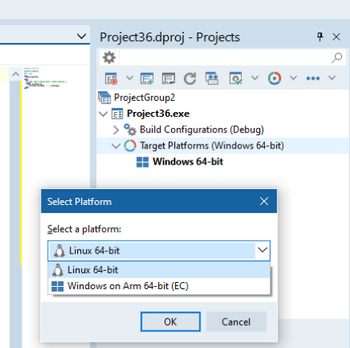
Both 32-bit and 64-bit versions of DCCLINUX64 support the Linux 64-bit target for Delphi applications. In the 64-bit IDE for Delphi, users can now target Win64, Arm64EC, and Linux64.
Delphi Windows Arm64EC Improvements
In this release, the Delphi Windows Arm64EC compiler adds support for building and using runtime packages. These sections detail this and other relevant improvements for the platform.
Dynamic Packages for Windows Arm64EC
This release implements Dynamic packages for DCCARM64EC, the newly added Delphi compiler for WinArm64EC.
WinArm64EC applications can now both produce and consume dynamic packages.
Packages were already supported before, since .dcu, .o, and .dcp files could be produced for static linking. With this update, applications that depend on BPLs or have Link with runtime packages enabled now work as expected.

Although one of the main advantages of WinArm64EC is the ability to load x64 DLLs, x64 BPLs cannot be loaded by Arm64EC applications. This is because DCC64 historically has not followed the standard ABI. While there may still be isolated ABI inconsistencies in DCCARM64EC, the goal is for DCCARM64EC to be fully aligned with the standard ABI. For this reason, x64 BPLs produced by the current DCC64 compiler cannot be supported by Arm64EC applications.
FastMM4 as default memory manager for WinArm64EC
The 13.2 release includes a detailed memory manager analysis for WinARMEC64; rpmalloc.
rpmalloc conserves the same allocation performance as the UCRT memory manager, but it greatly improves reallocation speed. Although it is faster, rpmalloc increases application memory usage and does not provide memory leak reporting.
Starting this release, the Win32 and Win64 memory managers have been ported to WinARMEC64 as the new default. rpmalloc remains available as an optional memory manager and can be enabled by adding System.RPMalloc as the first unit in the .dpr uses clause.
The new unit System.RPMalloc is available for WinArm64EC and Linux64.
Quality Improvements for Windows Arm64EC
Below is a list of the most notable fixes and enhancements for the Delphi Arm64EC compiler:
- Improved floating-point performance on WinArm64EC by optimizing exception handling, making Exp about 25x faster.
- Delivered RPmallocMM.inc.
- Added Calls to imported variadic functions.
- Added RTTI-based invocation logic.
- Added Debug information for class var, class threadvar, helpers, and open arrays.
- Added support for
.libfiles, in addition to.afiles, for static libraries declared in external function declarations. - Added an Arm64EC version of midas.dll.
- Improved build time for generic-heavy code, with a 20% improvement measured in Spring4D.
- Implemented the YieldProcessor built-in.
- Fixed incorrect resource string (.drc) files generated for WinARM64EC.
- Fixed various linking errors caused by missing .imp.o files.
Parallel Code Generation for WinArm64EC and Linux64
The new generation of LLVM-based Delphi compilers for WinArm64EC and Linux64, built with a newer LLVM version and new optimizers, now support parallel code generation. Parallel code generation can substantially reduce build times and bring performance close to DDC64.
Parallel code generation is most effective for projects with many units, especially in Release mode. The test results showed that after rebuilding all FMX units, Debug mode was 2x faster and Release mode was 14x faster.
This feature is available only for DCCLINUX64 and DCCARM64EC and is enabled by default. To reduce the risk of “insufficient memory” errors, it is enabled only in the 64-bit compiler version.
This feature is not available for Linux in the 32-bit IDE and the 32-bit command-line compiler. This feature is only available in the 64-bit IDE and the 64-bit compiler.
To disable or limit the number of threads, use the new Number of workers field in the Compiling and Running IDE options.

It is also possible to disable parallel code generation for individual projects using the Enable parallel codegen field in the Project > Options menu.
Additionally, parallel code generation can be controlled from the command line using the following options:
--parallel-codegen:auto automatically selects the number of worker threads.
--parallel-codegen:none disables parallel code generation.
--parallel-codegen:<N> uses the specified number of worker threads.
If no --parallel-codegen option is specified, --parallel-codegen:auto is used by default.
Delphi LLVM20 Compilers Codegen Improvements
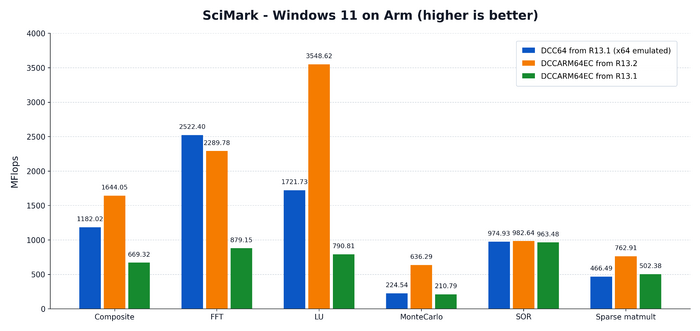
The 13.2 release introduced new optimizations that can deliver significant performance gains in Delphi’s LLVM compiler toolchain. These changes are active only in compilers updated to LLVM 20 (that is, Windows ARM and Linux Intel).
Previously, enabling IR suitable for those passes and LLVM 3.x did not provide the fine-grained optimization controls required for selected parts of the IR. With the LLVM version 20 upgrade and the related Delphi front-end refactorings, LLVM optimization can be enabled, delivering significant runtime performance improvements for Delphi applications on Linux and Windows Arm64EC.
The images below display the test results with substantial runtime performance improvements in Release mode.
Windows:
Linux:
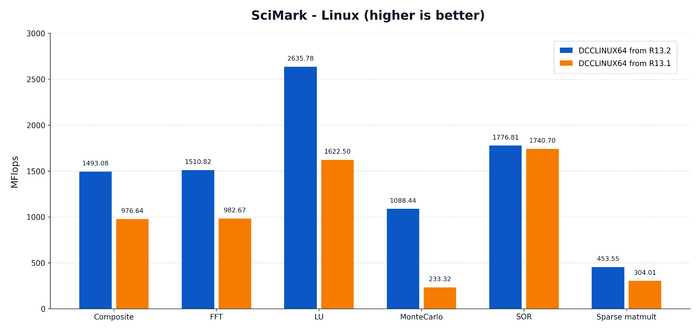
The build-time impact is mainly visible in Release mode with a build time increase of approximately 34% to 42%. Debug mode remains unchanged for DCCARM64EC.
C++ Clang 20 Compiler and Toolchain Improvements
This release improves support for packages in C++Builder, focusing on making package-based development more reliable and predictable. The changes address issues around package usage, build behavior, linking, and integration with the IDE.
Additionally, this release adds support for the Delphi memory manager on Win64x. Win64x (Modern) C++ target is aligned with MSVC and therefore uses the UCRT memory manager by default. To provide an optional path to mitigate memory-allocation-related performance issues, users can explicitly switch C++ to the Delphi RTL memory manager. Users need to define the required symbol in the main project source file, as follows:
int __CppUseDelphiMemMgr = 1;
Better BCC64X Integration with the IDE
Starting with RAD Studio release 13.2, BCC64X is now available as an in-process compiler, compclang201.dll, not just as the bcc64x.exe command-line tool. This brings accurate file and line progress, structured diagnostics in the Messages pane with source navigation, responsive cancellation, and a responsive UI.
Unlike the legacy compiler DLLs, compclang201.dll supports parallel compilation with --jobs=N. BCC32C and BCC64 implemented this by launching subprocesses, which required the Run C++ compiler in a separate process option and lost IDE integration. BCC64X uses threads inside the same process, so --jobs=N works in both bcc64x.exe and compclang201.dll with full IDE integration. The 32-bit IDE limits Win64x parallel compilation to 4 threads to reduce the risk of "insufficient memory" errors; the 64-bit IDE has no such limit.
During a build, the Build window shows the file currently being compiled with a (+N) suffix for the files compiled in parallel, and a line count combined across all of them.
Quality Improvements
This section lists several quality improvements for C++ Win64x and the C++ Packages included in the 13.2 release.
- Fixed icon group resources when linking multiple .res files that contain icon resources.
- Fixed excessive rebuilds in C++ Builder after Project Options modification.
- Reject circular
__propertydefinitions instead of crashing. - Fixed resource/dfm file path resolution.
- Auto-generate the package dependency information (.pdi) file during linking time.
- Fixed build of design-time C++ packages on a 64-bit target.
- Fixed C++ design-time sample package dclbcbsmp for 64-bit IDE.
- Fixed the build of C++ packages that contain Delphi units.
- Fixed failures when consuming C++ packages containing .pas files from other packages (due to missing _init_record<UnitName> exports).
Delphi Android
The RAD Studio 13.2 release includes the following updates for Delphi Android:
- Increased the default value of the
miniSdkVersionmanifest attribute from23to24. - Updated the installer and NDK integration to use the same version.
- Updated the Google AdMob library (plays-services-ads) to version
25.3.0. - Updated the Android Google Maps library (plays-services-maps) to version
20.0.0. - Updated the Billing library to version
9.1.0. - Added low-level platform support for Age Verification on Android.
- Added a new
Androidapi.JNI.PlayAgeSignalsunit that provides access to the platform age verification APIs (version 0.0.4).
Before using the age verification APIs on Android, the new 'Age Signals Service' option must be enabled on the Application > Entitlement List options page.
iOS
This release introduces the Age Verification API for iOS. With frameworks such as 'DeclaredAgeRange' and 'PermissionKit'.
Debugger Improvements
The 13.2 release includes several debugger improvements across C++ and Delphi, focused on value visualization, Local Variables and Watch display, and expression evaluation.
These changes improve the inspection of modern C++ data structures such as std::optional, std::any, std::variant, std::tuple, and STL iterators, while also strengthening the Delphi 64-bit debugging experience for Variants, arrays, indexed/default properties, and execution-point reliability.
Additionally, the debugger includes several workflow and performance improvements, such as the Symbol table options under Project > Options > Debugger that now allow users to specify which modules to debug. Also, this release optimizes Thread-name exception handling so it no longer unnecessarily suspends the IDE process; limits thread-info collection to the top frame of each thread; and removes duplicate thread-info calls during process suspension. User-defined environment variables are now also correctly passed to the debug process.
Symbol information reading mechanisms have also been improved, increasing debugging performance on large projects. Overall, debugger stability has also been increased.
Other Delphi Compiler Changes
This release introduces selective compiler optimization for the Delphi compiler. It introduces a new compiler directive that lets users enable specific optimizations, rather than all or nothing as before.
{$OPTIMIZATION <feature> ON|OFF}
At the moment, this is enabled only for two optimizations, CMOV and IFCONV, via the following directives:
{$OPTIMIZATION CMOV ON|OFF}
{$OPTIMIZATION IFCONV ON|OFF}
Libraries
This section describes all the updates and improvements to the RAD Studio libraries.
New VCL Controls
This release introduces two new modern VCL controls: TTabView and TNavigationView.
TTabView Control
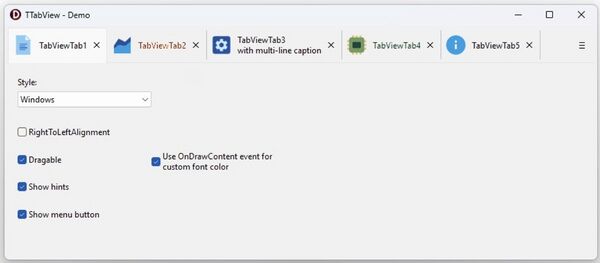
The new TTabView control is a new modern variant of the TTabSet control (which remains available). The control includes a tab collection with advanced features. Visually, the control will look like a TFormTabsBar control, but with the following new additional features:
- Tabs can host different controls, not just forms.
- Each tab has an image, multi-line text, and a close button.
- It has a dropdown button to show a dropdown menu with a full list of the tabs and a button to add a new tab.
- Scroll buttons will be placed on the left and right sides of the tabs.
Consider that this control resembles Microsoft's WinUI TabView control. This control can be used with the TTitleBarPanel.
Interaction with other controls happens with the TabIndex property, specific events including OnInitTab and OnSelectTab, and specific properties for tabs such as:
- Data: TPointer
- Control: TControl
- Tag: Integer
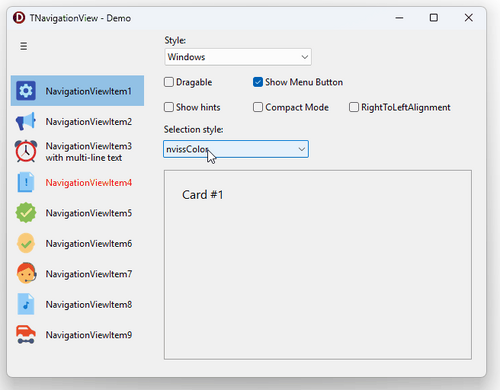
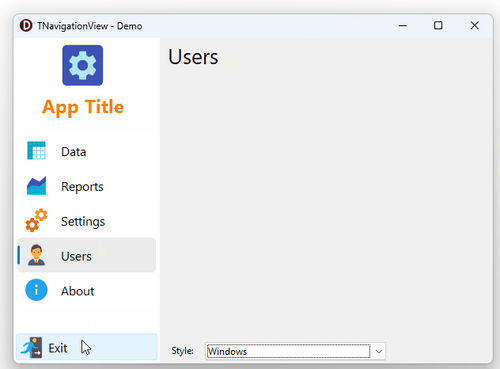
The TNavigationView control (like WinUI NavigationView) is a vertical-item control that can be used with any multi-page control, TFrame, or third-party control with pages.
The TNavigationView control includes a vertical items collection with advanced features. Items can be linked to some control with special properties and events (for example, the TCardPanel control). Each Item can include an image and multi-line text, and can be visually customized for special events. Items can also be scrolled and reordered by dragging. Controls can have either a normal or a compact width.
See below for examples from demos using this new control:
FMX Style Designer Extensions
This release extends the FMX Style Designer feature introduced in RAD Studio 13.1 with a broad set of new capabilities. Access it directly from the Tools > FMX Style Designer.
Among the new features, the following are the most significant additions:
- Loading VSF Style format files generated with the Bitmap Style Designer, so existing styles can be used as a starting point.
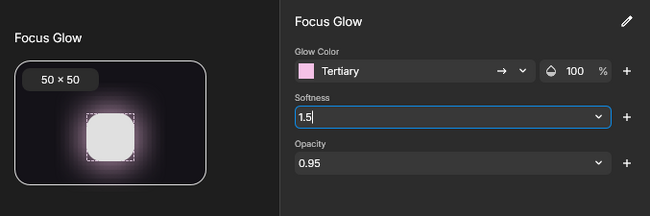
- The Sizes section is now named the Variables section and supports decimal values that are useful for effect properties like glow and shadow softness.
- Search tab to quickly locate colors, styles, and other resources by name in larger projects.
- Style analysis tool that scans a project and flags:
- Unused colors, fonts, effects, and images.
- Broken references to elements that no longer exist.
- Duplicate style names.
- Empty style names.
- Vector shape elements, added Circle and Ellipse that join the existing Rectangle.
- Rasterize option for vector elements, for cases where a bitmap-based style is preferred or required.
- Added a new Glow effect, alongside the existing Shadow.
- Support for combining multiple effects on the same element.
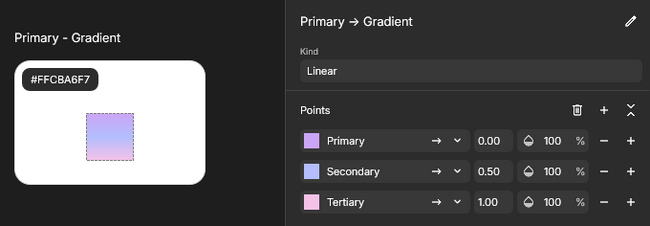
- Gradient color resources.
- Effects can be configured directly under a style's Text and Icon properties.
- Full text layout control that includes text parameters like wordwrap, alignment, trimming, etc.
FireMonkey Quality Enhancements
The following FireMonkey enhancements are included in this release:
- Updated Skia4Delphi from version 7.1.0 to version 7.2.0. This update restores Windows 7 support, broadens Linux compatibility, and includes a rendering performance fix.
- Reworked and enhanced the responsiveness of FireMonkey applications using animations on the Windows platform.
- Avoid providing the classpath to the Android DEX compiler for applications that set their minimum supported API level to 24 or higher (given they do not need to invoke that tool).
FireDAC
This release includes the following FireDAC updates:
- Updated FireDAC to support PostgreSQL 18.4.
- Added
offconnection parameter, with default valueoff. - Added support for Informix on Linux. See the Connect to Informix page for more information on how to use FireDAC with Informix ODBC Driver on Linux.
WebStencils and Internet
The following section lists the WebStencils and Internet updates and enhancements included in the 13.2 release:
- WebStencils now provides an explicit way to access a TField's information for a dataset using a specific patch (
@dataset.fields.<fieldname>). - Added a specific ESocketTimeoutError exception class to System.Net.Socket.
- Added the IHTTPNativeAPI interface to grant access to the original cert context of an HTTPRequest. Implemented by IHTTPRequest and IHTTPResponse on Windows and Linux.
- In the REST OAuth support, this release adds Authorization Code Flow with PKCE. To implement this, a new property was added: TOAuth2Authenticator.UsePKCE / CodeVerifier.
- TWebFileDispatcher has improved URL-matching logic (fixed path vs. mask) when the path is “
/” or an empty string.
RAD Server
Starting with this release, it is now possible to sort username and groupname on columns in the RAD Server Management Console.
Additionally, this release updated the RAD Server Management Console to be HiDPI-aware.